
banner

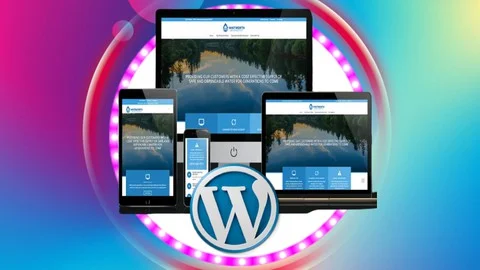
WordPress Website Creation — Complete Course

img

Course Overview

Learn how to build professional, responsive, and SEO-friendly WordPress websites from scratch without coding. This course covers everything from domain registration and hosting setup to designing business websites, blogs, portfolios, e-commerce stores, and optimizing performance for real-world projects.

Skill Level: Beginner to Advanced
Duration: 12–15 Hours (Self-Paced)
Format: Video Lessons + Practical Projects + Downloadable Resources + Assignments


Module 1: Introduction to WordPress

  • What is WordPress?
  • WordPress.com vs WordPress.org
  • Benefits of WordPress
  • Types of Websites You Can Build
  • Understanding the WordPress Dashboard
  • WordPress Terminology

Module 2: Domain & Hosting Setup

  • Choosing the Right Domain Name
  • Buying a Domain
  • Choosing a Hosting Provider
  • Connecting Domain with Hosting
  • Installing SSL Certificate
  • Installing WordPress
  • File Manager & cPanel Basics
  • Website Migration Basics

Module 3: WordPress Dashboard Mastery

  • Dashboard Overview
  • User Roles & Permissions
  • General Settings
  • Reading & Writing Settings
  • Discussion Settings
  • Permalinks Configuration
  • Time Zone & Language Settings

Module 4: Themes & Website Design

  • Installing Free & Premium Themes
  • Theme Customization
  • Header & Footer Setup
  • Typography & Color Settings
  • Creating Menus
  • Widgets & Sidebars
  • Responsive Design Principles
  • Child Themes

Module 5: Essential Plugins

  • Installing & Managing Plugins
  • Security Plugins
  • SEO Plugins
  • Backup Plugins
  • Cache & Speed Plugins
  • Contact Form Plugins
  • Image Optimization Plugins
  • Anti-Spam Plugins

Module 6: Creating Website Pages

  • Home Page
  • About Us Page
  • Services Page
  • Contact Page
  • FAQ Page
  • Privacy Policy
  • Terms & Conditions
  • Thank You Page
  • Custom Landing Pages

Module 7: Blog Management

  • Creating Blog Posts
  • Categories & Tags
  • Featured Images
  • Gutenberg Block Editor
  • Scheduling Posts
  • Blog Layout Customization
  • Comments Management

Module 8: Page Builders

  • Introduction to Elementor
  • Building Pages with Drag & Drop
  • Sections, Containers & Widgets
  • Responsive Editing
  • Global Styles
  • Templates
  • Reusable Blocks
  • Landing Page Design

Module 9: Forms & Lead Generation

  • Creating Contact Forms
  • Multi-Step Forms
  • File Upload Forms
  • Newsletter Signup Forms
  • Email Notifications
  • Spam Protection
  • Lead Capture Techniques

Module 10: WooCommerce Basics

  • Installing WooCommerce
  • Store Setup Wizard
  • Adding Products
  • Product Categories
  • Product Variations
  • Shipping Settings
  • Tax Configuration
  • Payment Gateway Setup
  • Order Management

Module 11: Website Speed Optimization

  • Improving Page Speed
  • Image Compression
  • Browser Caching
  • Minifying CSS & JavaScript
  • Lazy Loading Images
  • Database Optimization
  • CDN Basics

Module 12: SEO Fundamentals

  • Keyword Research
  • On-Page SEO
  • Meta Titles & Descriptions
  • XML Sitemaps
  • Internal Linking
  • SEO Plugins
  • Google Search Console
  • Google Analytics Setup

Module 13: Website Security

  • Strong Login Protection
  • Two-Factor Authentication
  • Malware Protection
  • Firewall Setup
  • Backup Strategies
  • Restoring Website Backups
  • Security Best Practices

Module 14: Website Maintenance

  • Updating WordPress
  • Updating Themes & Plugins
  • Website Health Check
  • Broken Link Monitoring
  • Performance Monitoring
  • Database Cleanup
  • Scheduled Backups

Module 15: Advanced WordPress Features

  • Custom Post Types
  • Custom Fields
  • User Registration
  • Membership Websites
  • Booking Systems
  • Multilingual Websites
  • Basic Custom CSS
  • Introduction to Hooks & Filters

Module 16: Website Integrations

  • Google Maps Integration
  • Social Media Integration
  • Live Chat Setup
  • WhatsApp Chat Button
  • Email Marketing Integration
  • Payment Gateway Integration
  • CRM Integration Basics

Module 17: Launching Your Website

  • Pre-Launch Checklist
  • Mobile Responsiveness Testing
  • Cross-Browser Testing
  • Fixing Common Errors
  • Website Backup Before Launch
  • Going Live
  • Post-Launch Monitoring

Module 18: Freelancing with WordPress

  • Creating a Professional Portfolio
  • Finding Clients on Fiverr & Upwork
  • Pricing Your Services
  • Writing Winning Proposals
  • Managing Client Projects
  • Website Handover Process
  • Maintenance Packages
  • Building Long-Term Client Relationships

There are no reviews yet.

Add a Review
Comment
Your rating
  • Downloads:
    44
  • Released On:
    16 February 2021
  • Version:
    1.0
  • Compatibility:
    WordPress 5.7.x,
  • Framework:
    Elementor, Redux, Kirki