Course Overview
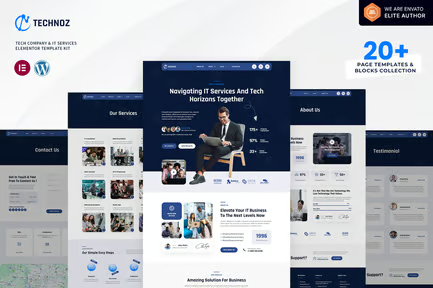
Learn how to use, customize, and deploy 20 professionally designed WordPress page templates for business, e-commerce, portfolio, agency, and landing page websites. This course teaches you how to edit templates using Elementor or the WordPress Block Editor, replace demo content, optimize layouts, and launch conversion-focused websites quickly.
Skill Level: Beginner to Intermediate
Duration: 3–5 Hours (Self-Paced)
Format: Video Lessons + Premium Templates + Practical Projects + Downloadable Resources
Module 1: Introduction to WordPress Templates
- What are WordPress Page Templates?
- Benefits of Using Premium Templates
- Choosing the Right Template
- Elementor vs Gutenberg Templates
- Importing Demo Content
- Customizing Without Coding
Module 2: Installing & Importing Templates
- Installing Required Themes
- Installing Essential Plugins
- Importing Template Kits
- Fixing Import Errors
- Setting Homepage & Blog Page
- Creating Backup Before Editing
Module 3: Homepage Templates
- Corporate Business Homepage
- Digital Agency Homepage
- Startup Landing Page
- Personal Portfolio Homepage
- Freelancer Homepage
- Online Store Homepage
- Service Business Homepage
Module 4: Business Pages
- About Us Page
- Services Page
- Our Team Page
- Why Choose Us Section
- Company Timeline
- Mission & Vision Page
Module 5: Lead Generation Pages
- Landing Page
- Sales Page
- Webinar Registration Page
- Lead Magnet Download Page
- Appointment Booking Page
- Thank You Page
Module 6: E-commerce Templates
- Product Landing Page
- Product Category Page
- Featured Product Page
- Shop Page
- Cart Page Design
- Checkout Page Layout
- Order Confirmation Page
Module 7: Portfolio & Creative Templates
- Personal Portfolio
- Photography Portfolio
- Graphic Designer Portfolio
- Video Creator Portfolio
- Architecture Portfolio
- Case Study Page
Module 8: Blog Templates
- Blog Homepage
- Single Blog Post
- Category Archive
- Author Profile
- Newsletter Signup Section
- Related Posts Layout
Module 9: Contact & Support Pages
- Contact Us Page
- FAQ Page
- Help Center
- Customer Support Page
- Live Chat Integration
- Google Maps Integration
Module 10: Customizing Templates
- Editing Text & Images
- Changing Fonts & Colors
- Replacing Icons
- Editing Buttons
- Custom Sections
- Mobile Responsiveness
- Reusable Global Elements
Module 11: Speed & Performance
- Optimizing Images
- Reducing Page Load Time
- Removing Unused Widgets
- Performance Testing
- Mobile Optimization
- Best Practices
Module 12: SEO & Conversion Optimization
- Optimizing Page Titles
- Meta Descriptions
- Internal Linking
- Call-to-Action Placement
- Trust Elements
- Conversion Rate Optimization
Module 13: Publishing Your Website
- Final Website Review
- Testing Forms
- Mobile Device Testing
- Browser Compatibility
- Launch Checklist